Schedulers
A schedule is a saved prompt plus a trigger. Slo runs it later without anyone at the keyboard: a morning test report, a check on the repo every hour, an audit next Tuesday.
Slo doesn't run its own background service for this. It uses the scheduler your operating system already has:
- macOS:
launchd - Linux:
cron
When a schedule is due, the OS runs slo schedule execute --name <schedule>. Slo loads the schedule, does the work once, writes a record of what happened, and exits.
Quick start
Create a schedule:
slo schedule add \
  --name "Daily summary" \
  --prompt "Summarise today's changes and any failing tests." \
  --cron "0 18 * * *" \
  --cwd ~/code/payments \
  --session-mode fresh
Register it with your OS so it actually runs:
slo schedule install --name "Daily summary"
At 18:00 every day it runs as a headless slo run and saves a record. Check the records with:
slo schedule reports --name "Daily summary"
Fresh or continuous
The session mode decides whether runs build on each other:
| Mode | Each run... | Good for |
|---|---|---|
fresh | starts a brand-new session | Daily summaries, one-off checks |
continuous | continues one named session | Watching a repo over time, release prep, checking on a long workflow |
Triggers
Each schedule has exactly one:
| Flag | Meaning |
|---|---|
--cron "0 18 * * *" | A standard five-field cron expression. |
--interval-seconds 300 | Every N seconds. |
--run-at "2026-10-20T09:00:00+00:00" | Once, at that time. |
Add --tz for the time zone of a cron trigger (default UTC), and --model or --cwd to choose the model and folder.
All the commands
| Command | What it does |
|---|---|
add | Create a schedule. |
edit | Change one, keeping its id. |
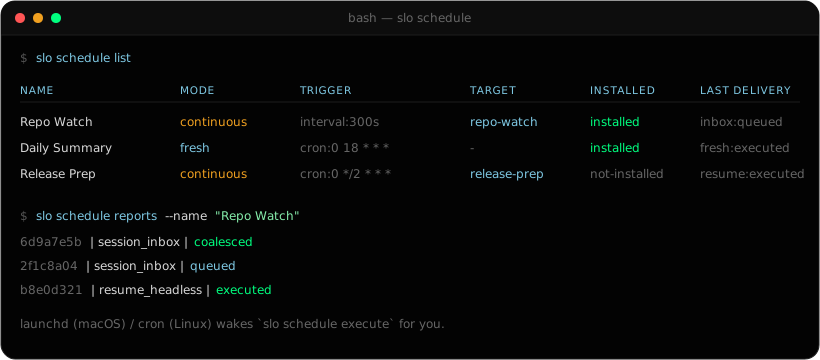
list | Every schedule with its mode, trigger, target session, whether it's installed, and its last run. |
show | One schedule. |
execute (or run) | Run it now. This is what the OS calls. |
install / uninstall | Register it with the OS, or remove it. |
reports | Past runs of a schedule. |
show-report | One past run in detail. |
cleanup | Delete old run records, keeping the newest --keep (default 100). |
More examples
A one-off audit
slo schedule add \
  --name "Release audit" \
  --prompt "Audit the release branch and list anything that would block deployment." \
  --run-at "2026-10-20T09:00:00+00:00" \
  --session-mode fresh

slo schedule execute --name "Release audit"
Watching a repo without flooding yourself
For frequent checks, point every run at one session and keep only the newest pending check:
slo schedule add \
  --name "Repo watch" \
  --prompt "Check the repo and summarise new failures, flaky tests and regressions." \
  --cron "*/5 * * * *" \
  --cwd ~/code/payments \
  --session-mode continuous \
  --session-reference repo-watch \
  --coalescing-mode latest_by_key \
  --coalescing-key repo-watch
latest_by_key means a newer check replaces an older one that hasn't run yet. Come back after an hour away and you'll find one waiting, not twelve. The run record shows it as coalesced.
Looking after your records
slo schedule list
slo schedule reports --name "Repo watch"
slo schedule show-report --name "Repo watch" --run-id 6d9a7e5b-...
slo schedule cleanup --name "Repo watch" --keep 25
Running into a session you have open
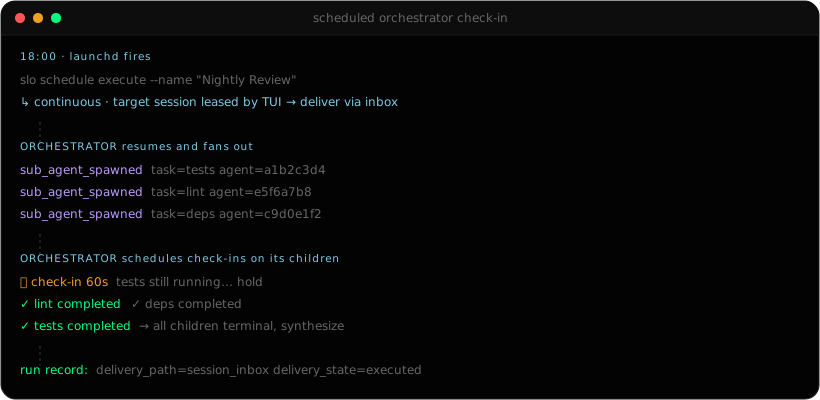
This is the part that keeps things safe. If a continuous schedule targets a session that's open in a TUI right now, starting a second process on the same session would mean two writers on one conversation.
So Slo doesn't. Instead:
- The scheduled prompt goes into that session's inbox.
- The TUI picks it up when it's idle, and runs it as a normal turn.
- If the session isn't open anywhere, Slo resumes it in the background instead.
Scheduled work can feed a live session without ever tripping over you.
How it fits together
slo schedule add        saves the prompt and trigger under ~/.slo/schedules/
slo schedule install    registers it with launchd or cron
the OS scheduler        runs: slo schedule execute --name <schedule>
Slo                     does the work once and writes one run record
On macOS each schedule becomes a file in ~/Library/LaunchAgents/. On Linux each gets a marked block in your crontab. Logs go to ~/.slo/schedules/logs/, and the run records under runs/ are the source of truth.
Checking in on a dynamic workflow
A scheduled run doesn't start sub-agents itself. But it can check on a dynamic workflow that's already going, by sending a prompt into the orchestrator's session every hour:
slo schedule add \
  --name "Nightly review check-in" \
  --prompt "Check the running sub-agents. Report which phases are still going,
            retry anything stalled, and summarise what's finished." \
  --cron "0 * * * *" \
  --session-mode continuous \
  --session-reference nightly-review \
  --coalescing-mode latest_by_key \
  --coalescing-key nightly-review

slo schedule install --name "Nightly review check-in"
Watch it any time with slo visualize --session nightly-review --follow. More recipes in Put Slo on autopilot.