Dynamic workflows
Normally Slo works alone: one agent, one context window, one thing at a time. In a dynamic workflow it becomes an orchestrator. It reads the workflow, splits it into phases, and hands each phase to its own sub-agent, a separate Slo process with a clean context. The orchestrator watches them, retries what fails, and puts the results together.
Ask for it with the words "dynamic workflows":
"Use dynamic workflows to run code-test-review for task 12.b in specifications/12-refunds/."
It's called dynamic because the plan isn't fixed in advance. The orchestrator decides as it goes how many sub-agents to start, what each one does, and whether they run one after another or side by side.
Why it gives better results
A single agent on a long task piles everything into one context: the spec, code it wrote an hour ago, test output, review notes. The important parts get diluted, and later steps drift.
Giving each phase its own sub-agent fixes that:
- Focus. The sub-agent writing tests sees what it needs for tests, not the review notes from another phase.
- Contained failures. A phase that goes wrong is one process. The orchestrator retries it once with better instructions instead of letting it spoil the whole run.
- Parallel work. Independent phases run at the same time, so reviewing five modules takes about as long as the slowest one.
- A second pair of eyes. The work is checked by a different agent than the one that did it.
- An orchestrator with room to think. It doesn't do the heavy lifting itself, so it can keep the whole job in view.
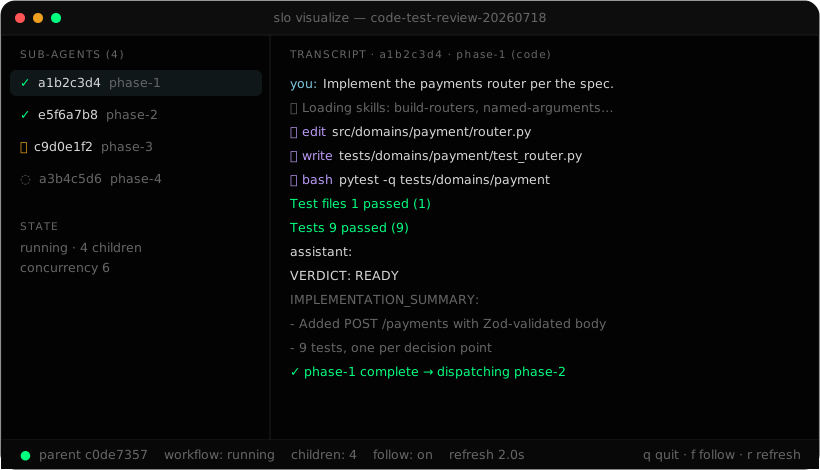
An example: code-test-review
Code-test-review has three steps: code and test, review, completion check. Run it normally and one agent carries all three in one context. Run it as a dynamic workflow and each step gets its own sub-agent:
| One session | Dynamic workflow | |
|---|---|---|
| Context | One window holds code, tests and review | Each step starts clean |
| When a step goes wrong | It affects everything after | Only that step is retried |
| Reviewing many modules | One after another | One sub-agent per module, in parallel |
| Who checks the work | The same agent that wrote it | A different sub-agent |
Code-test-review is a pipeline, so its steps run in order and each waits for the one before to finish. A workflow with independent parts, like reviewing several modules, runs them side by side and then adds a final step that combines the results.
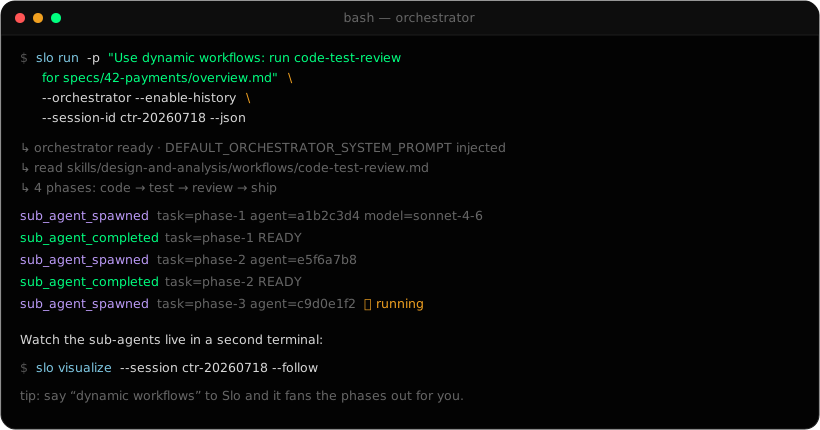
In your session or in the background
| You say | What happens |
|---|---|
| "use dynamic workflows" | The orchestrator runs in your session. You wait for it. |
| "...detached", "...in the background", "headless dynamic workflows" | It runs as its own process. You get your prompt back straight away and progress arrives as notes. Manage it with /workflows. |
From a script, run it headless with --orchestrator:
slo run \
  -p "Use dynamic workflows: run code-test-review for task 12.b in specifications/12-refunds/." \
  --orchestrator \
  --enable-history \
  --session-id refunds-12b
Watching it
When the first sub-agent starts, Slo opens slo visualize in a new terminal window. If it can't, it prints the command:
slo visualize --session refunds-12b --follow
The left side lists each sub-agent with its status: ⏳ running, ✓ completed, ✗ failed, ⊘ aborted, ◌ pending. The right side shows the selected sub-agent's transcript. Press d for its error output, o for the orchestrator's own instructions, and q to close. Closing the window never stops the workflow.
The full walkthrough, including how to stop, resume and debug a workflow, is in Supervise a dynamic workflow.
Choosing models per phase
Each sub-agent can use its own model and reasoning level. Say it in plain English:
"Use dynamic workflows. Do the review with claude-opus-4-8 on high, and the coding with claude-sonnet-4-6 on medium."
Settings that matter
The defaults are set for long runs. You'll most often want more parallel sub-agents:
export SLO_SUBAGENT_MAX_CONCURRENCY=6               # sub-agents at once (default 4)
export SLO_STREAM_INACTIVITY_TIMEOUT_SECONDS=10800  # orchestrator silence limit (default, 3h)
export SLO_SUBAGENT_INACTIVITY_TIMEOUT_SECONDS=7200 # sub-agent silence limit (default, 2h)
Don't lower the silence limits. A long planning or summary step can be quiet for a while and still be working. Every setting is in Environment variables.
When to use one
- Workflows with distinct steps that benefit from a clean start each, such as code-test-review or feature specifications.
- Reviews and audits that cover many files or modules.
- Long jobs you want to leave running and check on later.
- Recurring work: pair it with schedules so the orchestrator wakes up on a timer and checks its sub-agents.