Keep long conversations moving
Slo summarises older history to make room for what's next. Compaction now works more reliably across providers, with a nudge before large histories slow you down and visible activity when you run /compact.
Open source coding agent · GPL v2
Slo is a coding agent for your terminal that follows your team's conventions. Brief it like an engineer and it plans, builds, tests and reviews the change. For the big jobs it hands the work to a team of sub-agents and checks what they did.
macOS and Linux · OpenAI, Anthropic, Kimi and OpenRouter
Recent updates · v0.21
Use OpenRouter with an API key, pick the new GPT-6 models with a ChatGPT plan or an API key, and sign in from another device when Slo runs on a remote machine.
Add your OpenRouter API key with /auth and use any model it can call. Try openrouter:typesafe/jev-router or openrouter:deepseek/deepseek-v4.1-flash.
gpt-6-luna, gpt-6-sol and gpt-6.1-sol, each with a context window of about a million tokens. They work with a ChatGPT sign-in or an OpenAI API key.
Running Slo over SSH or in a container? Pick device code in /auth, open the link on any device and enter the code. Slo finishes signing in on its own.
Slo summarises older history to make room for what's next. Compaction now works more reliably across providers, with a nudge before large histories slow you down and visible activity when you run /compact.
Clearer conversations, easier-to-read code and tables, and text you can select and copy. The new terminal UI makes it easier to follow Slo as it works.
New provider data lives in its own files, so an older Slo can still read your sign-ins and sessions. A session saved on a model Slo no longer knows resumes on your default model, history intact.
How it works
Every task runs the same loop, whether it's a one-line fix or a feature that takes all afternoon.
Say what done looks like, what to read first and what is off limits. Plain English is fine.
Slo loads the skills that fit the job and your project notes, then reads the code before it writes any.
It writes the change and a test for every decision point. Big jobs are split across sub-agents.
Tests run, a review checks the work against your conventions, and Slo tells you what is left.
Why Slo
Most coding agents are great at a first draft. Slo is built for the part after that: your conventions, your tests, your review bar.
116 skills cover routers, services, tests, migrations, git, specs and reviews. Slo picks the right ones for each task. Drop your own SKILL.md into ~/.slo/user_skills/ and yours wins.
Say "dynamic workflows" and Slo becomes an orchestrator. Each phase gets its own sub-agent with a clean context, and a separate reviewer checks the result. Watch them live, stop one, resume later.
Slo reads your SLO.md, AGENTS.md and project notes on every session, and can keep a knowledge base up to date as it learns. The tenth session knows what the first one figured out.
Use the terminal UI, or run it headless with JSON output and real exit codes for CI. Schedule it with cron or launchd. Switch between OpenAI, Anthropic, Kimi and OpenRouter, and pool models so a rate limit on one falls back to the next.
The habit that matters
The people who get the most from Slo write briefs, not one-liners. Six things: the outcome, where the truth lives, what to read first, what's off limits, what to hand back, and what "done" means. Five minutes of writing buys an hour of work you don't have to redo.
How to write a brief →Beyond the terminal
Same agent, same skills, same conventions. For long-running, multi-step workflows, we recommend headless: let the work run in the background and check in when you need to.
Slo gives each phase a focused sub-agent and brings the results together. Better progress tracking and recovery help you supervise long runs and resume stalled or failed workflows.
Learn more →HeadlessAsk for "headless dynamic workflows" to launch the job in the background and get your prompt back. Follow along with slo visualize. For scripts and CI, slo run gives you JSON output and exit codes.
Save a prompt with a schedule and your OS runs it: launchd on macOS, cron on Linux. No daemon to babysit.
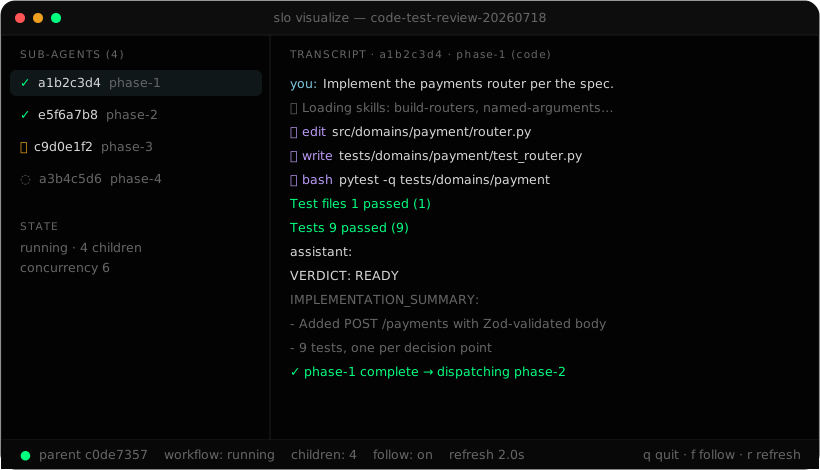
slo visualize shows every sub-agent in a dynamic workflow as it runs.Choices we made
Some agents stay minimal and leave the process to you. We went the other way.
Long jobs go better when each phase starts with a clean context and something else checks the result. So Slo has an orchestrator, and you can watch it work.
Slo ships with conventions for naming, structure, tests and reviews. Every one of them is a markdown file you can replace.
OpenAI, Anthropic, Kimi and OpenRouter, one command apart. Pool them and a rate limit becomes a reroute instead of a stall.
Slo runs on your machine and talks to your model provider. Schedules use the scheduler your OS already has.
Models
Sign in with OpenAI, Anthropic, Kimi For Coding or OpenRouter. Switch any time with /model, or set up a model pool so a rate limit on one sends the work to the next.
Start here
Read these in order and you'll be using Slo the way its heaviest users do.
Install, sign in, write an SLO.md and ship your first reviewed change.
Read the guide →Guide 2The six-part brief that lets Slo work for an hour without guessing.
Read the guide →Guide 3Start one, watch it, stop it, resume it, and read why a sub-agent failed.
Read the guide →Install
slo.Works on macOS and Linux.
curl -fsSL https://get-slo.sh/install.sh | bashPaste the command above. It installs the slo command and the skill library.
Run slo in any project folder. The first time, it asks you to sign in to a model provider.
Follow Your first hour to go from a fresh install to a reviewed change.