Headless & server agent
The TUI is where you think out loud with Slo. slo run is the same agent with no UI: you give it a task, it streams JSON events to stdout, and it exits with a code your script can check. Same skills, same conventions.
Use it in a shell script, a CI job, a cron entry, a webhook handler, or as a sub-agent under an orchestrator.
Recommended for long-running workflows
Use headless workflows for jobs with several steps, such as planning, implementation, testing and review. Each phase can run in a focused sub-agent while you check progress separately.
From the TUI, ask:
"Use headless dynamic workflows to run code-test-review for task 12.b in specifications/12-refunds/."
Slo launches the workflow in the background and returns your prompt. Use slo visualize to watch it and /workflows to manage it. If a workflow stalls or fails, /workflows resume <workflow-id> resumes it against its saved history.
From a script, use slo run --orchestrator with --enable-history. A shell invocation stays in the foreground unless you arrange otherwise; "headless" means no UI, not automatic shell detachment. See Dynamic workflows for a complete example.
Your first headless run
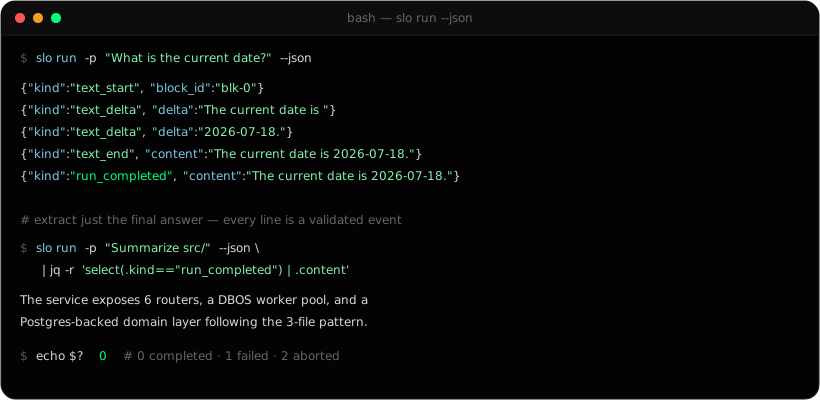
slo run -p "What is the current date?"
Every line on stdout is one JSON event:
{"kind":"text_start","iteration":0,"block_id":"blk-0"}
{"kind":"text_delta","iteration":0,"delta":"The current date is "}
{"kind":"text_delta","iteration":0,"delta":"2026-07-18."}
{"kind":"text_end","iteration":0,"content":"The current date is 2026-07-18."}
{"kind":"run_completed","iteration":0,"content":"The current date is 2026-07-18."}
The last line is always one of three: run_completed, run_failed or run_aborted.
--json is accepted for compatibility, but the output is always JSON lines either way.
Using the output
Because every line is JSON, the usual tools work.
Just the final answer:
slo run -p "Summarise the architecture of src/" \
  | jq -r 'select(.kind == "run_completed") | .content'
Print the answer as it streams:
slo run -p "Write a haiku about Python" \
  | jq -j 'select(.kind == "text_delta") | .delta'
Count tool calls by name:
slo run -p "Refactor utils.py" \
  | jq -r 'select(.kind == "tool_call_end") | .tool_name' \
  | sort | uniq -c | sort -rn
From Python:
import json, subprocess

proc = subprocess.Popen(
    ["slo", "run", "-p", "Analyse src/"],
    stdout=subprocess.PIPE, text=True,
)
for line in proc.stdout:
    event = json.loads(line)
    if event["kind"] == "text_delta":
        print(event.get("delta", ""), end="", flush=True)
    elif event["kind"] in {"run_completed", "run_failed", "run_aborted"}:
        print(f"\nFinished: {event['kind']}")
proc.wait()
Exit codes
| Last event | Exit code | Meaning |
|---|---|---|
run_completed | 0 | It worked. |
run_failed | 1 | Something went wrong. |
run_aborted | 2 | It was stopped: by SIGTERM, a timeout wrapper, /workflows abort, or its parent process ending. |
slo run -p "Run the linter and fix what it finds" > lint.jsonl
case $? in
  0) echo "Done." ;;
  1) echo "Failed." ;;
  2) echo "Stopped." ;;
esac
stdout and stderr
Both are JSON lines, and you can read them separately:
- stdout is the agent's work: text, tool calls, the final result.
- stderr is the run's own lifecycle: when it started, a heartbeat every 15 seconds, how it ended.
slo run -p "Refactor utils.py" > output.jsonl 2> run.log
Flags you'll use
| Flag | Default | What it does |
|---|---|---|
-p, --prompt | required | The task. |
--model | your saved choice | Model for this run, such as claude-opus-4-8. |
--reasoning | the model's default | off, minimal, low, medium, high or xhigh. |
--cwd | current folder | Folder to work in. |
--enable-history | off | Save the session so you can come back to it. |
--resume <id or name> | Continue a saved session. Turns history on. | |
--session-id <id> | a new id | Choose the session id. |
--orchestrator | off | Allow sub-agents, for dynamic workflows. |
--append-system-prompt-file | Add extra instructions for this run. |
Every flag is in the CLI reference.
Slo as a server agent
On its own, each slo run is a one-off. Give several runs the same session id with history on, and they become one ongoing conversation. That's how you use Slo as a backend for a service.
Scope each request to a project
slo run -p "List every file with a TODO comment" --cwd ~/projects/my-api > todos.jsonl
Carry one conversation across steps
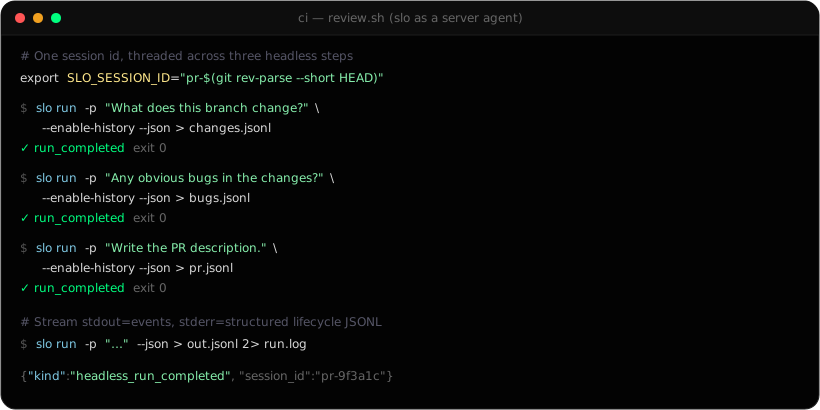
Set SLO_SESSION_ID once and every slo run in that shell shares the conversation:
export SLO_SESSION_ID="pr-$(git rev-parse --short HEAD)"

slo run --enable-history -p "What does this branch change?"          > changes.jsonl
slo run --enable-history -p "Any obvious bugs in those changes?"     > bugs.jsonl
slo run --enable-history -p "Write a PR description from the above." > pr.jsonl
The third call knows what the first two found, just as it would in the TUI.
Put a time limit on it
There's no timeout flag, so use timeout. When it sends SIGTERM, Slo stops cleanly and exits with 2:
timeout -k 15 300 slo run -p "Long analysis task" > out.jsonl
Ideas
- Review in CI. Run
slo runon every merge request and fail the job on the exit code or a fixed last line. See Put Slo on autopilot. - Batch jobs. Loop over repositories or files and keep each JSON log as a record.
- A service backend. Shell out to
slo run --cwd <repo> --enable-history --session-id <ticket>per request and stream thetext_deltaevents back. - Scheduled tasks. The scheduler runs
slo runon a timer for you. - Fan out. Add
--orchestratorand Slo runs and supervises sub-agents itself.
Saved sessions
With history on, a session is saved under ~/.slo/sessions/history/<session-id>/:
├── session.json     id, name, model, folder, timestamps
├── events.jsonl     everything that happened, append-only
└── transcript.md    a readable copy
Continue it later by id or name:
slo run -p "Carry on with the refactoring" --resume pr-9f3a1c